A memory you can actually inspect.
Preferences are structured, versioned records with confidence and supporting evidence. Investigate what your twin has learned instead of treating a chat history as a personality.
How your twin remembers →Open-source personal AI · Desktop alpha · Apache 2.0
An assistant should learn what matters to you—not make you explain yourself forever. SkyTwin is building a personal twin with memory you can inspect, decisions you can question, and boundaries you control.
Usable alpha. Install the packaged app on Apple Silicon macOS, x64 Windows, or x86-64 Linux—and, if you choose, connect a real Gmail inbox from its desktop window with a Google OAuth app you create. An already authenticated browser session can use the same local dashboard; a fresh browser cannot inherit the desktop session. It is unsigned and not the evidence-gated beta. The same current build also offers the guarded account-free sample. What’s ready today?
The idea
Personal AI gets interesting when it has context. It gets useful when you can see that context, correct it, and decide what it is allowed to do.
Preferences are structured, versioned records with confidence and supporting evidence. Investigate what your twin has learned instead of treating a chat history as a personality.
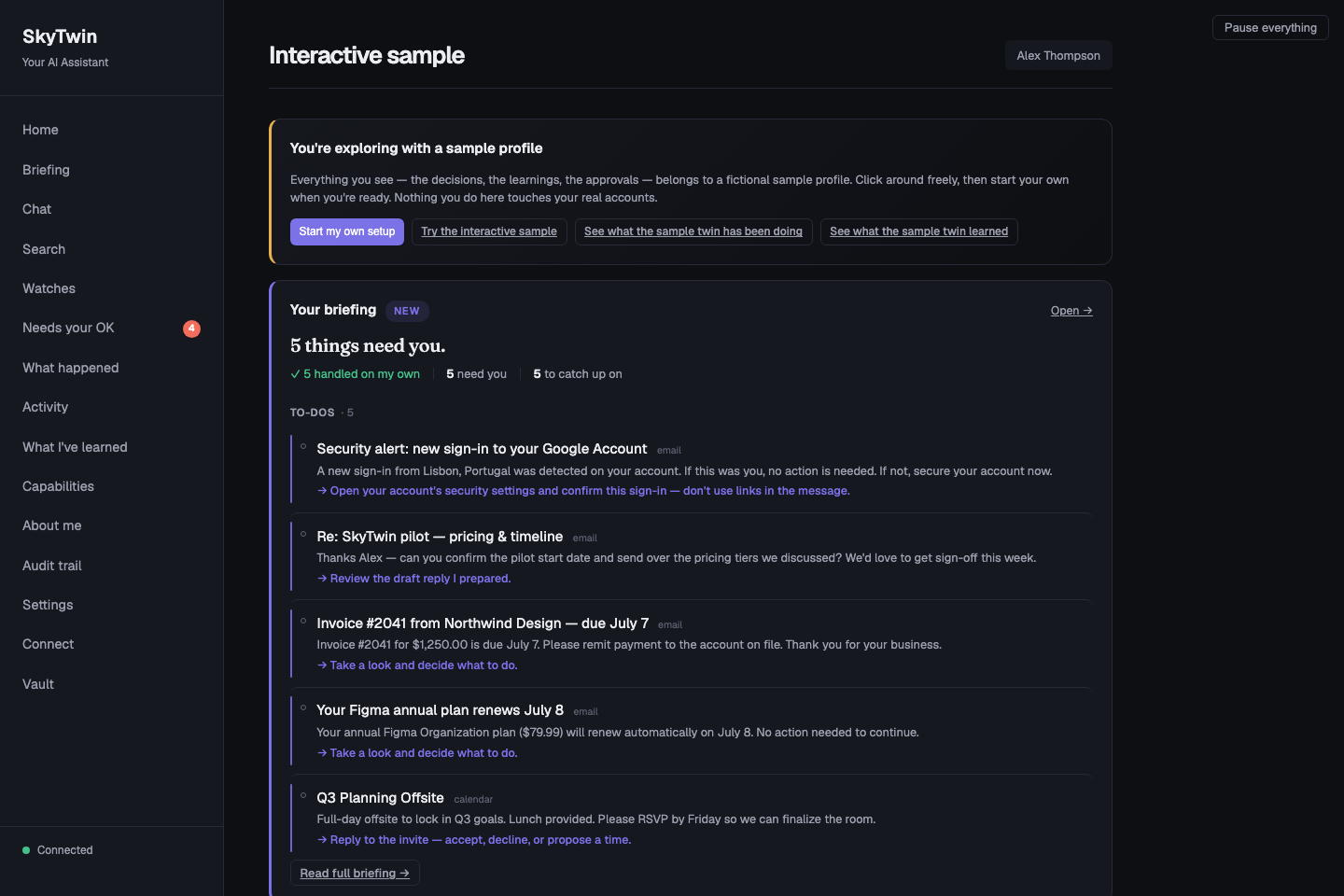
How your twin remembers →See the situation, the proposed action, and why it needs your attention. The sample puts fictional decisions and explanations in front of you so you can judge the interaction for yourself.
Walk through a decision →The source pipeline checks policy, trust, risk, and spend before admitting actions. New users start at observer. A model’s suggestion does not grant permission to act.
Understand the controls →Choose how you want to try it
The downloadable alpha is a real desktop app. The current source sample is newer and isolated from accounts. The browser tour needs no installation at all.
Download the desktop alpha for Apple Silicon Mac, x64 Windows, or
x86-64 Linux. It is an earlier unsigned build, so read the warning
and expect your OS to ask for confirmation. Its optional Google
setup can ingest a real Gmail inbox through the desktop dashboard.
The same UI is available at localhost:3200 only after
that browser is authenticated.
Run current source, choose Just show me around, and inspect the latest guarded fictional profile without an inbox, provider key, or model download.
Run current source →Read the screenshot-led walkthrough, compare the briefing and explanations, and decide whether the product is worth running.
Take the guided tour →http://localhost:3200/#/connect-gmail for an already
authenticated browser. It walks you through
creating your own Google Cloud OAuth client for Gmail. Start with a
test account and read the credential/token-custody warning.
Follow the real-inbox guide →
Beyond a one-off prompt
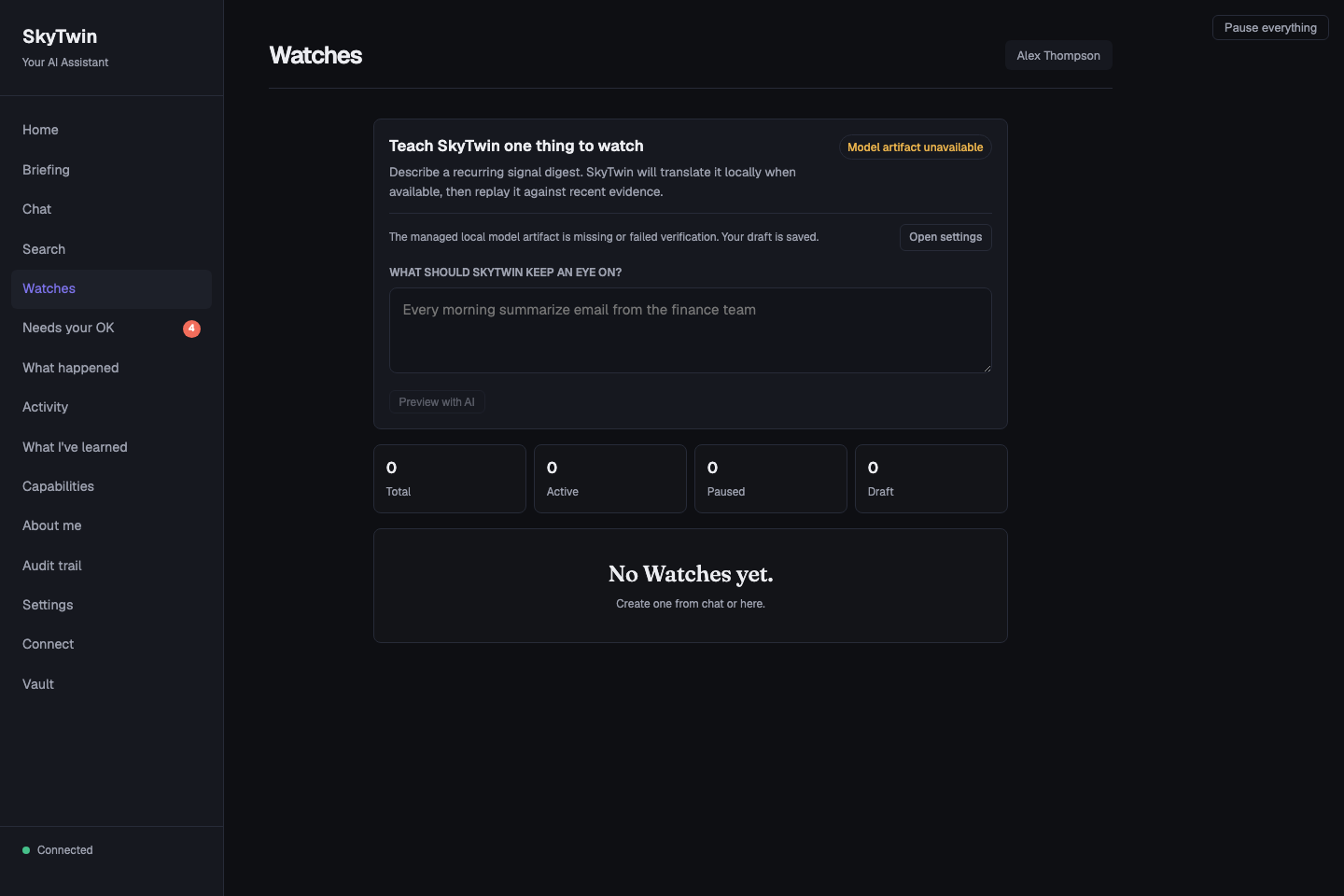
A Watch is a read-only digest of signals you choose. The versioned workflow in source lets you review a proposal, replay it against recent signals, activate it explicitly, and return to a previous version.
That is the direction: personal behavior you can improve without losing the ability to understand what changed.
Explore versioned Watches →Advanced source feature. Not part of the disposable sample. AI authoring requires a qualified model/runtime; the maintained embedded model and stock Ollama do not currently qualify. Read-only digests do not send, delete, or spend.
Choose where the thinking happens
Keep reasoning on your machine, or explicitly choose a remote route. These are different boundaries—not interchangeable marketing labels.
Default
Use a compatible embedded runtime and model, or local-only Ollama. Local failure never selects a remote provider. Setup downloads are explicit; a working runtime and model are still required.
Local setup and model requirements →Verified route
TrustedRouter is admitted only for explicit interactive calls after SkyTwin verifies fresh same-session gateway attestation and an exact-byte confidential-route receipt. Verification failure returns no content and never falls back. NEAR AI remains unavailable.
TrustedRouter trust record ↗ · SkyTwin’s verification boundary →Explicit opt-in
Bring a hosted provider under its own terms. Prompts cross the network; this mode does not make a confidential-computing promise.
Compare inference modes →Go as deep as you want
You do not need to understand the architecture to understand the product. And if you want the architecture, we will not hide it from you.
Tour, setup, everyday concepts, and answers in plain language.
Make it yoursMemory, privacy, models, approvals, and what a Watch can do.
Build on itScoped MCP, exact source references, APIs, operations, and contribution guides.
All documentation · FAQ · Agent guide · MCP setup · Technical reference · llms.txt · Evidence deck
Where we are today
The long-term goal is a personal twin that handles more of the routine, on your terms. Today, the supported entry point is a local, desktop alpha or a local, fictional-data developer preview.
v0.7.0-beta remains blocked by
signing, notarization, clean-machine verification, and
release-wide evidence. Source checks do not certify a downloadable
artifact. The update client can check for artifacts, but
signed-update installation is not yet verified.
Full release status → · Integration status · Connect your Gmail inbox · Claim ledger · Download technical preview — desktop alpha (older artifacts; not the current sample)
Signals become context, then typed candidate actions. Policy checks trust, spend, provenance, risk, and approvals before a route can proceed. Supported paths record explanations and feedback; release-wide coverage is still under audit. Missing provenance is untrusted external—not an invitation for a model to assign itself authority.
SkyTwin is Apache-2.0 open source. Use it, inspect it, modify it, and build on it. Try the sample, report a confusing interaction, or contribute a narrow, tested improvement. Personal features are intended to remain free; team and hosted offerings are future plans, not products available today.
Contribution guide · Issues and feedback · Product direction
Your next five minutes
Start with a fictional day. Decide what you would want it to learn.
Prefer the tour or current source sample before adding personal data.